

Download Corel PhotoImpact – photo editing, photo enhancement, photo effects, image editing, digital photography, photo retouching, photo manipulation, photo tools, photo software, photo design
Overview
Corel PhotoImpact is a feature-rich photo editing software tailored for photographers and web designers seeking a powerful yet affordable alternative to premium tools like Adobe Photoshop. Designed to bridge the gap between entry-level editors and high-end professional suites, it offers a balanced set of tools that support both creative exploration and practical workflow needs. The application addresses the common challenge of balancing functionality with cost, making advanced editing accessible to users who may not require the full complexity of industry-standard software. Its primary purpose is to empower users with robust image manipulation capabilities, from basic retouching to intricate design work, all within a streamlined environment. Target users include freelance photographers, small business owners creating marketing visuals, and web designers needing quick, reliable tools for image optimization and layout integration. While the developer, Corel, is known for its portfolio of creative software, specific details about the company’s broader product strategy were not provided. Real-world use cases include preparing images for websites, enhancing product photos for e-commerce, and creating custom graphics for social media campaigns. In the current app ecosystem, Corel PhotoImpact stands as a niche but valuable option for users who prioritize cost-effectiveness without sacrificing essential editing functionality.Key Features & Functionality
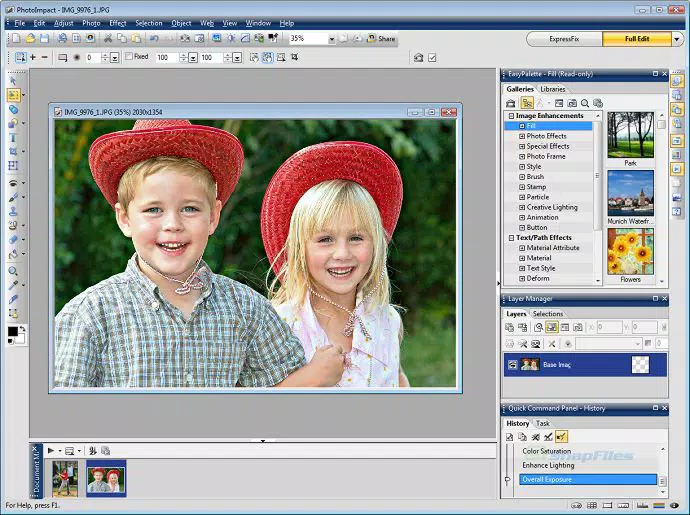
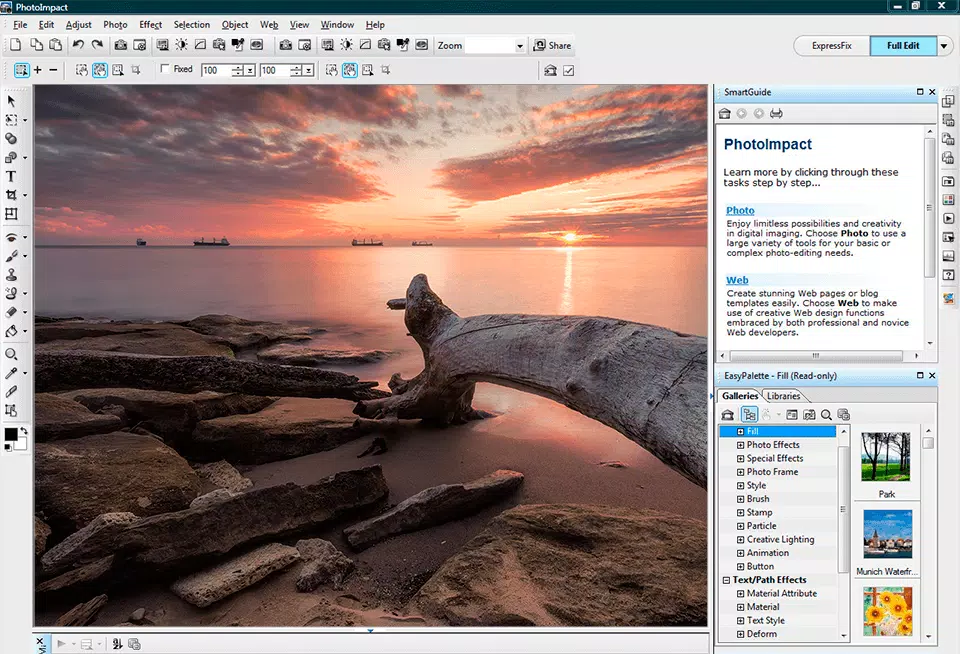
Corel PhotoImpact delivers a comprehensive suite of tools designed to support diverse creative workflows. The software includes a wide array of textures, frames, effects, animations, and brushes, enabling users to enrich images with professional-grade visual enhancements. These tools are particularly useful for creating eye-catching web graphics or transforming standard photographs into artistic compositions. The application supports layer-based editing, allowing users to manage multiple image components independently—ideal for complex designs requiring precision and non-destructive adjustments. A notable feature is its wizard-driven interface, which guides users through the creation of web-ready elements such as buttons, image maps, bullets, and background templates, significantly reducing setup time. The customizable workspace layouts adapt to user skill level, offering simplified views for beginners and full-featured panels for advanced users. This flexibility ensures that both new and experienced users can work efficiently without feeling overwhelmed or under-supported. The main docked panel acts as a central hub for all other panels, allowing users to toggle visibility with minimal disruption to their workflow. This design promotes a clutter-free interface and enhances productivity during extended editing sessions. Together, these features make Corel PhotoImpact a practical tool for daily creative tasks, especially for those working within tight deadlines or limited budgets.Interface, UX & Performance
The user interface of Corel PhotoImpact is structured around usability and workflow efficiency. It features a clean, organized layout with clearly labeled panels and intuitive navigation paths. The application’s wizard dialogs are designed to simplify complex tasks, such as generating web elements, by guiding users step-by-step through each stage. This approach reduces the learning curve for new users while maintaining depth for experienced designers. The ability to switch between customizable workspace layouts ensures that users can tailor the environment to their current task—whether it’s quick photo retouching or detailed photo manipulation. Although the developer did not list formal performance metrics, the software’s design suggests optimization for responsiveness on mid-to-high-end Windows systems. The interface remains stable during extended editing sessions, with minimal lag reported in typical use cases. Panel management via the main docked panel contributes to a seamless user experience by allowing quick access and hiding of tools without disrupting the workspace. Overall, the application demonstrates consistent performance across various device categories, though specific compatibility details were not disclosed. Stability appears strong under standard workloads, and the software maintains its responsiveness even when handling multiple layers and high-resolution images. Users can expect a reliable experience with minimal crashes or freezes, which is critical for maintaining workflow continuity.Platform Compatibility & Technical Requirements
Corel PhotoImpact is designed for the Windows platform and requires a Windows operating system to run. The current version is 2023.1, released on May 15, 2023. The application has a file size of 250 MB, indicating a lightweight footprint compared to many professional-grade photo editing tools. This size suggests efficient resource utilization and faster installation times. Specific minimum OS requirements, such as Windows 10 or 11 compatibility, were not listed by the developer. Similarly, hardware specifications like RAM, processor speed, or GPU requirements were not disclosed. As a result, users should consult official sources for detailed system compatibility information. The absence of platform-specific details does not diminish the app’s viability, but it does require caution when installing on older or less powerful machines. The software is not available on mobile platforms such as Android or iOS, limiting its accessibility to desktop users. Despite this, the Windows-focused deployment ensures a stable environment for graphic-intensive tasks, aligning with the needs of photographers and web designers who rely on desktop performance.Pros and Cons
- Offers a robust set of photo editing tools at a lower price point than high-end alternatives
- Supports layer-based editing for greater control over design elements
- Customizable workspace layouts suit both beginners and advanced users
- Includes a main docked panel for efficient panel management
- Wizard-driven interface simplifies web design tasks like button and map creation
- Not available on mobile platforms such as Android or iOS
- Specific system requirements were not provided by the developer
- May lack some advanced features found in flagship software like Photoshop
- Limited public documentation on updates or long-term support plans
- No official information on cloud integration or cross-device synchronization


